Collector guide
Card Edge Whitening and Grading: What Graders Actually See
Learn how card edge whitening affects grading, how to spot it under good light, and how to pre-check edges with Card Grading AI before you submit.
By Matteo G.
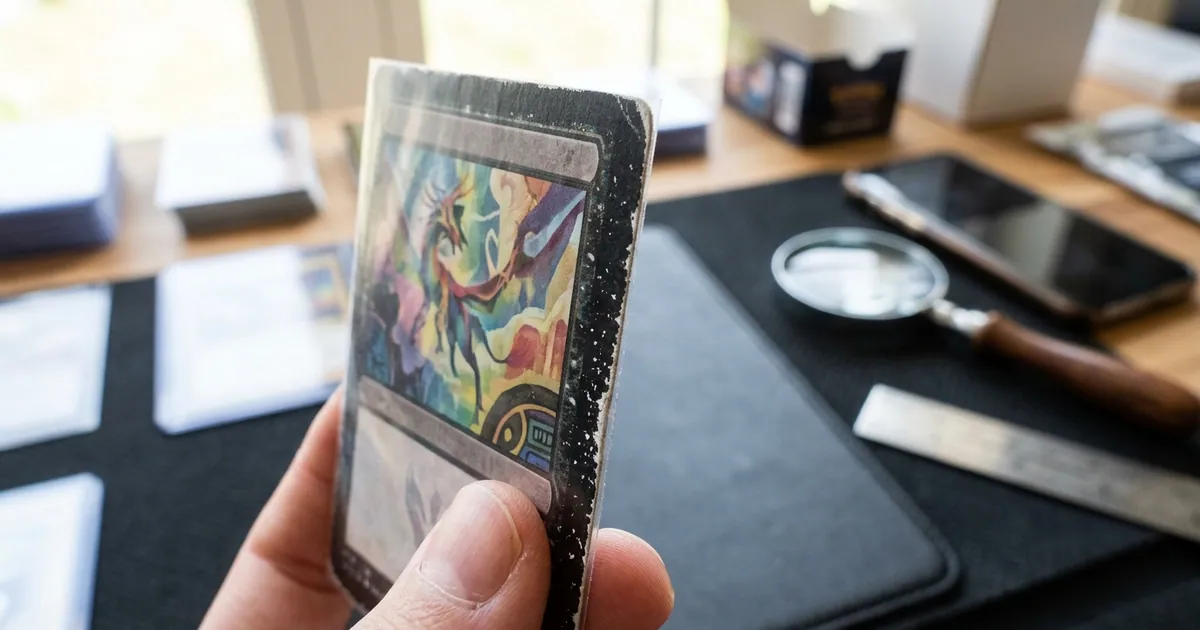
Edge whitening is one of the most common reasons a card that looks mint at arm’s length comes back as a PSA 8 or 9. It is also one of the easiest defects to miss, because the white specks along a card’s perimeter often blend into a sleeve, a table surface, or a poorly lit photo. If you are serious about card edge whitening grading outcomes, you need to learn to see edges the way a grader does: straight on, under bright and even light, one side at a time.
This guide explains what edge whitening actually is, how the major grading companies weigh it, how to inspect your own cards without damaging them, and how to use an AI pre-grade to filter your submissions before you spend money on fees and shipping.
What Edge Whitening Actually Is
Trading cards are layered. Most modern cards consist of a printed front, a printed back, and a paper or clay-coated core sandwiched between them. That core is white or off-white. When the printed layer at the perimeter gets abraded, compressed, or chipped, the core shows through as a small white line, dot, or fuzzy band along the edge.
That is edge whitening. It is not dirt, and it cannot be wiped off. On a card with a black or dark-colored border, the contrast is dramatic and a single millimeter of exposure jumps out. On a white-bordered card, the same physical wear may be nearly invisible, which is one reason white-bordered sets can be more forgiving in grading.
Common causes include:
- Pack and factory handling. Cards can come out of the pack with edge wear already present from cutting, stacking, or the sheeting process.
- Sleeving and unsleeving. Pushing a card into a tight penny sleeve repeatedly grinds the leading edge.
- Binder pages. Sliding cards in and out of pocket pages is a leading cause of one-sided whitening.
- Riffling through stacks. Thumbing through a pile of loose cards chips edges quickly.
- Deck play. Shuffling is brutal on edges, which is why played TCG cards rarely grade high.
How Graders Treat Edge Whitening
PSA, BGS, and CGC all evaluate edges as part of the overall condition assessment, and BGS and CGC break it out as a distinct subgrade. The general logic across companies is similar: they look at how much of the perimeter is affected, how visible it is, and whether it reads as wear or as manufacturing.
Here is a practical way to translate what you see into likely grade impact. Treat this as a planning tool, not a rulebook, since every grader applies judgment.
| What you see on the edges | Typical grade ceiling | Notes |
|---|---|---|
| No visible whitening under bright light | 10 possible | Other factors like centering and surface still decide the grade |
| One or two pinpoint specks, hard to see | 9, sometimes 10 | Often the difference between a 9 and a 10 on dark-bordered cards |
| Light whitening visible along one edge | 8 to 9 | Very common on binder-stored cards |
| Whitening on multiple edges or a continuous band | 7 to 8 | Reads clearly as handling wear |
| Chipping, notches, or feathered edges | 6 or lower | Material is missing, not just abraded |
Two things collectors underestimate. First, edge whitening compounds. A card with light whitening on all four edges will grade lower than a card with the same total amount of whitening concentrated in one small spot. Second, edges interact with corners. Whitening that runs into a corner tends to be read as corner wear, which is penalized more heavily. If you want detail on that boundary, our corner-focused breakdown pairs well with this one, and the Pokemon card grading guide covers how dark-bordered modern sets amplify both issues.
How to Inspect Edges Properly
Most collectors inspect cards at a glance, holding them face-up under a ceiling light. That posture hides edges almost completely. Do this instead.
- Remove the sleeve, or check through a fresh, clear sleeve. Scuffed sleeves create fake whitening and hide real whitening.
- Use one bright, diffuse light source. A desk lamp with a white shade or a window with indirect daylight works. Avoid bare bulbs and direct sun, which blow out detail.
- Hold the card perpendicular to your line of sight, one edge at a time. Rotate the card so you are looking straight down the length of each edge, not at the face.
- Tilt slightly back and forth. Whitening pops when light rakes across the edge at a shallow angle.
- Place the card on a dark, matte background. A black mouse pad or sheet of black cardstock makes white specks obvious.
- Use a loupe only for confirmation. A 10x loupe will find something on almost every card. Grade with your eyes; verify with magnification.
Work through all four edges, then note which edge is worst. That detail matters later, because a single bad edge on an otherwise clean card is a different submission decision than four mediocre edges.
Photographing Edges for AI Analysis
If you plan to run a pre-grade, photo quality controls everything. Edge defects are small, low-contrast features, and they disappear fast in bad images.
- Shoot on a neutral gray or black surface so the card’s perimeter has contrast.
- Use two soft light sources at roughly 45 degrees, or one large diffuse source, to kill glare and hard shadows.
- Fill the frame with the card. Cropped-in detail is worth more than a wide shot.
- Keep the camera parallel to the card so edges are not distorted by perspective.
- Wipe your phone lens. A smudged lens softens exactly the detail you need.
- Capture front and back. Whitening frequently shows worse on one side.
Our walkthrough in how it works explains the capture flow step by step, and features covers what the analysis reports back on edges, corners, centering, and surface.
Using an AI Pre-Grade to Make Submission Decisions
The real cost of edge whitening is not the grade itself. It is paying $20 to $150 in grading fees plus shipping on a card that was never going to hit the number you needed. A pre-grade is a cheap filter.
With AI card grading in Card Grading AI, you scan the front and back, and the app returns an estimated grade range with flags for likely edge whitening, corner wear, centering, and surface issues. Use that output to sort your stack into three piles:
- Submit now. Clean edges, strong centering, high-value card. The estimate supports the grade you need.
- Submit only if the 9 pays. Light whitening on one edge. Run the math: does a 9 still clear your fees and leave profit versus selling raw?
- Keep raw. Multiple whitened edges or chipping. Sleeve it, enjoy it, and skip the fees.
One rule to internalize: these are estimates and pre-grades meant to inform your decisions. They are not official grades, appraisals, or guarantees, and they do not replace PSA, BGS, CGC, TAG, or any other grading company. The value is in avoiding obviously bad submissions and prioritizing the cards that deserve the fee.
Preventing Edge Whitening Going Forward
You cannot undo whitening, but you can stop creating it.
- Sleeve first, always. Penny sleeve, then a semi-rigid or toploader for anything you might grade.
- Load sleeves gently. Slide the card in with the sleeve opening flared rather than forcing it.
- Avoid binder pages for grade candidates. Binders are great for sets, hard on edges.
- Handle by the flat faces. Pinching edges between fingertips transfers oils and compresses the core.
- Never fan or riffle a stack of cards you care about.
- Store upright in a box, not stacked in a tall pile where weight presses edges.
Key Takeaways
Edge whitening is a visibility problem more than a severity problem. The same amount of physical wear that would be invisible on a 1988 white-bordered card will cap a modern black-bordered chase card at an 8. Learn to inspect edges straight on under raking light, photograph them with real contrast, and use a pre-grade to filter your stack before you pay fees.
Ready to check your edges? Scan a card with Card Grading AI on web, iOS, or Android, review the edge and corner flags in your report, and decide with data instead of hope. Start with the features overview to see what each scan includes.
FAQ
Does edge whitening automatically prevent a PSA 10?
Not automatically, but it makes a 10 much harder. Graders allow a tiny amount of manufacturing-related edge wear on some cards, yet visible white specks along a dark border are usually enough to cap a card in the 8 to 9 range. If whitening appears on multiple edges or is visible without magnification, plan on a 9 at best.
Can I fix or trim edge whitening before submitting?
No. Coloring an edge with a marker, sanding it, or trimming the card is alteration, and grading companies routinely detect it. An altered card gets labeled as such, which destroys far more value than an honest PSA 8. The only acceptable steps are gentle surface dust removal and careful handling.
How is edge whitening different from corner wear?
Edge whitening is white exposure of the card's paper core along the straight perimeter, while corner wear appears at the four points where edges meet. Graders evaluate them as separate subgrades, and corners are usually penalized more harshly because they are easier to see and often show fraying or rounding.
Can Card Grading AI detect edge whitening from a phone photo?
Card Grading AI analyzes the edges in your scans and flags likely whitening, chipping, and edge wear as part of a pre-grade estimate. Results depend heavily on photo quality: use even, diffuse light and fill the frame with the card. The output is an estimate to guide your submission decisions, never an official grade.
Do modern cards show edge whitening more than vintage cards?
Modern cards with dark or full-bleed borders show it far more visibly because the white paper core contrasts sharply with the printed edge. Vintage cards with white borders can hide minor edge wear, but they often show other issues instead, such as chipping, print wear, and soft corners.
Keep reading
Related guides
Ready to inspect your next card?
Scan your cards instantly with Card Grading AI
Capture a clear front-and-back photo, review an AI-assisted condition estimate, and keep standout cards organized in your collection.