Collector guide
Card Corner Damage Grading: A Collector's Guide
Learn how graders evaluate card corner damage, how to inspect corners at home, and how AI pre-grading estimates corner condition before you submit.
By Matteo G.
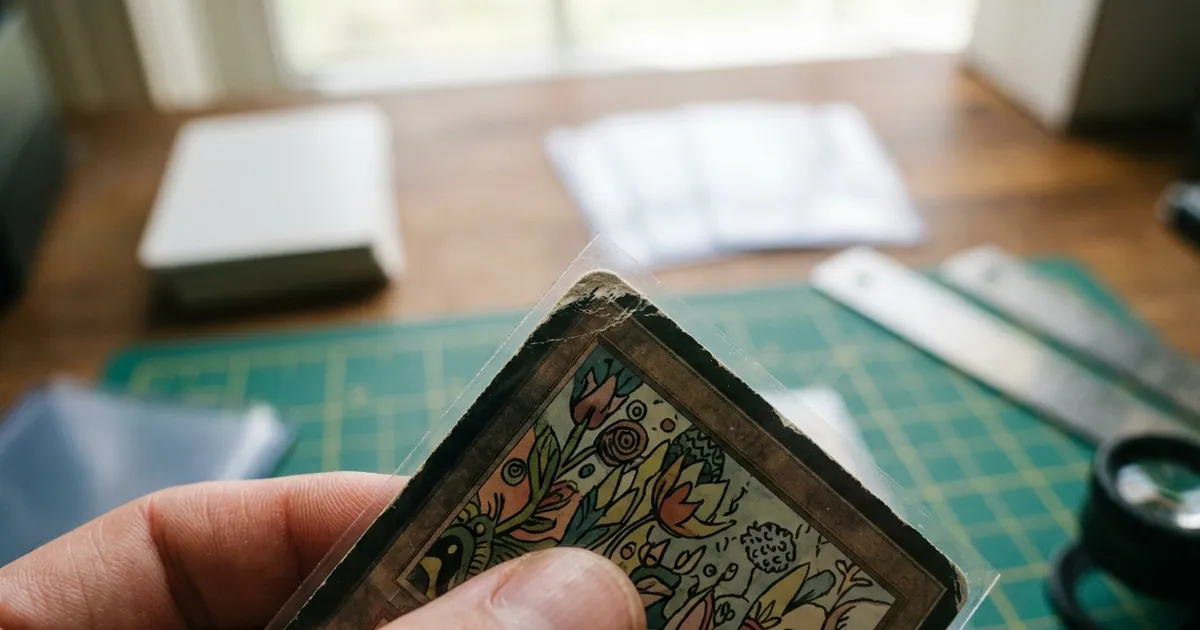
Corners are where most grades go to die. You can nail centering, keep the surface clean, and still lose a 10 because one corner has a hint of white showing through the ink. Understanding card corner damage grading is one of the fastest ways to improve your submission results, because corners are both the most common defect and the easiest one to check at home before you spend money on a grading order.
This guide covers how professional graders look at corners, the vocabulary you need, how to inspect your own cards without making the damage worse, and how to use AI pre-grading to sanity-check your judgment before you ship.
Why Corners Carry So Much Weight
Most grading companies evaluate four core categories: centering, corners, edges, and surface. Corners get outsized attention for three practical reasons.
First, corners are structurally fragile. A trading card is layered paper stock with a thin ink and coating layer on top. At a corner, three cut edges converge, so any pressure pushes the fibers apart and the white core shows through.
Second, corner wear is objective and visible. Two graders may quibble about whether a surface line is a print defect or a scratch, but a blunted corner is a blunted corner. That makes it a reliable, low-argument deduction.
Third, corner damage is almost always handling damage, not factory damage. Graders know a rounded corner means the card was shuffled, pocketed, or stacked loose in a box. That signals a card that has lived a hard life.
If you want a broader refresher on how the four subgrade categories interact, our AI card grading overview walks through the full picture.
The Vocabulary of Corner Defects
Using the right terms helps you talk to buyers and read grader notes accurately.
- Sharp / razor sharp: The corner comes to a crisp point with no visible white, even under magnification.
- Whitening (fuzzing): The ink layer has worn at the tip, exposing the white paper core. This is the most common modern defect.
- Soft corner: The point is slightly rounded or blunted but the layers are intact.
- Fraying: Paper fibers are lifting and the corner looks fuzzy rather than clean.
- Dinged corner: A small impact point has compressed the card, often with a visible dent that catches light.
- Bent corner: The corner has folded and returned, leaving a crease line. This is a structural defect and usually a severe deduction.
- Layer separation (delamination): The front or back layer is peeling from the core. This typically caps the card in the low numeric grades.
- Rounded corner: The point is gone entirely, replaced by a curve. Common on played vintage and well-loved bulk.
One subtle note: whitening on the back of a card is often more visible than on the front because card backs are frequently dark or heavily colored. A card can look mint face-up and reveal four white corner tips when you flip it. Always inspect both sides.
How Corner Condition Maps to Grades
Grading companies do not publish exact per-corner formulas, and final grades are holistic. Still, the practical relationship between corner condition and outcome is consistent enough to plan around.
| Corner condition | Typical grade impact | Realistic ceiling |
|---|---|---|
| Four razor-sharp corners, nothing visible at 10x | No deduction | Gem Mint territory |
| One corner with faint whitening visible only under a loupe | Minor | Often 9, sometimes 10 |
| Visible whitening on one or two corners at arm’s length | Moderate | 8 to 9 |
| Soft or blunted corners on multiple sides | Significant | 6 to 8 |
| One bent or creased corner | Severe | 4 to 6 |
| Multiple rounded corners plus fraying | Severe | 1 to 4 |
Two cautions. A single flaw can cap a card regardless of how clean everything else is, so a perfect-centering card with one dinged corner is not a 10 candidate. And crossing a grade threshold matters financially far more than the point difference suggests, which is why the gap between a 9 and a 10 is worth checking carefully before you pay for a submission. Our breakdown of how pre-grading works explains how to build that check into your routine.
How to Inspect Corners at Home
You need almost no equipment, but technique matters more than gear.
Use raking light. Place a single bright light source low and to the side of the card, then rotate the card slowly. Direct overhead light hides dents and creases; angled light makes them pop as shadows. This one change reveals more corner dings than any magnifier.
Compare against a control. Pull a card you know is factory fresh from the same set and lay it beside the card you are evaluating. Corners are relative, and your eye calibrates fast when you have a reference.
Check all eight corner faces. Four corners, front and back. Tilt the card so you view each corner nearly edge-on to see whether the tip is blunted rather than just worn in the ink.
Use a loupe, but know its limits. A 10x loupe or jeweler’s magnifier shows you what a grader might catch, but do not panic-downgrade based on magnification alone. Graders inspect under bright light with the naked eye plus magnification for confirmation.
Handle by the edges, in a sleeve. Every inspection session is a chance to create the damage you are looking for. Slide the card into a penny sleeve first, inspect through the sleeve, and only remove it if absolutely necessary. Never rest a card on a hard surface where a corner can catch.
Preventing Corner Damage in the First Place
Corner damage is cumulative and permanent, so prevention pays better than any inspection routine.
- Sleeve immediately. The moment a card leaves a pack, it goes into a penny sleeve. The rip-and-flip photo can wait.
- Use a semi-rigid or top loader for anything valuable. Penny sleeves protect against scratches, not impacts. Rigid protection absorbs corner blows.
- Load top loaders carefully. Forcing a sleeved card into a tight top loader is a leading cause of corner whitening. Slide it in straight and slow, and never push against a stuck corner.
- Do not overstuff binder pages. Pages packed with thick cards press corners against pocket seams. Nine-pocket pages with side loading are safer than top loading for long-term storage.
- Store boxes upright and full. Cards leaning inside a half-empty box slide and take corner hits every time the box moves.
- Ship with care. Team bag, top loader, then a rigid sandwich of cardboard. Most corner damage on eBay purchases happens in transit, not in the previous owner’s collection.
Where AI Pre-Grading Fits
Human eyes get tired and optimistic, especially with a card you want to be a 10. AI pre-grading gives you a consistent second opinion before you commit to submission fees and months of turnaround.
With Card Grading AI, you photograph or scan the front and back of a card, and the app analyzes corner regions alongside centering, edges, and surface to return an estimated pre-grade with category sub-scores. Because corners are the most frequent cap on modern cards, seeing a corner sub-score flagged before you pay is often the difference between a smart submission and a wasted slot.
A few practical tips for accurate corner analysis:
- Shoot on a flat, neutral background with even lighting and no glare across the corners.
- Keep the full card in frame, square to the camera, with a little margin on all four sides.
- Capture front and back. Back corner whitening is easy to miss and heavily penalized.
- Photograph out of the top loader when safe, since thick plastic edges can obscure corner detail.
If you collect Pokemon, corner scrutiny is especially harsh on glossy holo cards where whitening contrasts with dark borders, and our Pokemon card grading guide covers set-specific quirks. And because corners and centering together decide most gem outcomes, it is worth pairing your corner check with a centering measurement in the same session.
Deciding What to Submit
Once you have inspected corners honestly, the decision gets simpler.
If all four corners are sharp on both sides and centering is strong, the card is a legitimate gem candidate and worth grading if the value supports the fee. If one corner shows visible whitening, treat the card as a 9 candidate and submit only when a 9 still clears your cost. If two or more corners are soft, rounded, or dinged, the card is usually better sold raw with clear, honest photos of the corners, which builds trust and avoids paying grading fees to certify a mid grade.
Always remember that AI results from Card Grading AI are estimates and pre-grades intended to inform your decisions. They are not official grades, appraisals, or guarantees, and only PSA, BGS, CGC, TAG, and similar companies issue certified grades. Use pre-grading to filter your inventory, then let the graders make the final call.
Ready to check your corners? Scan a card with Card Grading AI and see your estimated corner sub-score in seconds.
FAQ
Can a card with corner whitening still get a PSA 10?
It is unlikely. PSA 10 (Gem Mint) expects four sharp corners with no visible wear under normal inspection. Faint whitening visible only under a loupe on one corner sometimes still gems, but any whitening you can see with the naked eye usually caps the card at a 9 or lower. If corner wear is clear on a scan, plan for a 9 at best.
Is corner damage worse than edge wear or surface scratches?
Corners tend to be weighted heavily because they are the first place handling wear shows and they are easy for any grader to see. A single soft corner can cost more grade points than light edge nicks of similar size. Surface issues can be just as costly when they are print lines or scratches through a holo, but corners are the most common reason a modern card misses a 10.
Can corner damage be repaired before grading?
No. Trimming, rebuilding, or coloring a corner is card alteration, and grading companies reject or label altered cards, which destroys value and your reputation as a seller. Cleaning loose surface dust is fine; changing the card's structure is not. If a corner is damaged, grade the card as is or keep it raw.
How does Card Grading AI evaluate corners?
You photograph or scan the front and back, and Card Grading AI analyzes corner regions along with centering, edges, and surface to produce an estimated pre-grade with sub-scores. It is an unofficial estimate designed to help you decide what to submit, not a replacement for PSA, BGS, CGC, or TAG grading.
Do corners matter on vintage cards as much as modern ones?
Graders apply the same criteria, but market expectations differ. A 1999 Base Set card with razor corners is rare, so strong corners add a big premium, while light corner softness on vintage is more tolerated by buyers. On modern cards, sharp corners are expected, so damage is punished harder in price.
Keep reading
Related guides
Ready to inspect your next card?
Scan your cards instantly with Card Grading AI
Capture a clear front-and-back photo, review an AI-assisted condition estimate, and keep standout cards organized in your collection.